Lifecycle assurance for hospitals
Right access. Every person. Proven.
Built for hospital IT. When a physician, nurse, resident or contractor joins, changes role or leaves, Essentriq turns it into one controlled case: approved, applied across your systems, checked against the directory, and kept as evidence for your privacy and audit teams.
No proof, no close. A case closes when the intended outcome is verified and the evidence exists, not because automation ran.
- Start with clinical leavers. Residents rotating out, locums ending and staff leaving: prove each one lost access and returned devices.
- Your hospital directory. Entra ID, Okta and Microsoft 365 today; on-prem AD via the in-network agent in preview.
- Your service desk stays the front door. Approvals run inside ServiceNow or Jira; the ticket is closed with the outcome.
Integrates with what you already use
Solid = connector available in Settings today. Preview = configurable, agent in preview. Dashed = coming soon, not yet shipped.
 Entra ID
 Microsoft 365
 Okta
 ServiceNow
 Jira
- ServiceDesk Plus

 BambooHR
- Active DirectoryPreview
 ExchangeComing soon
From chaos to control
Hospital access
wasn’t built to
work as one system.
Credentialing, HR, the directory, the EHR and the service desk each hold part of a clinician’s access. The gaps between them are where a departed resident keeps a login, and where the privacy audit stalls.
- HR / HCMWorkday, BambooHR: hires and changes
- Service deskServiceNow, Jira: tickets, approvals
- Active DirectoryOn-prem accounts and groups
- Microsoft 365 & Entra IDLicences, mailboxes, sign-in
- Clinical systemsEHR, pharmacy and imaging accounts
- Spreadsheets & emailManual trackers and reminders
- One record for every identity changeJoiners, movers and leavers in one place.
- Consistent access and licensingPolicy decides; the directory is read back to confirm.
- Accountability for shared accountsShared workstation and service accounts each have an owner and a review date.
- Clinical leavers closed with proofEHR access removed and badges and devices returned before the case closes.
- Approvals inside your service deskNo more chasing across tools.
- Evidence created during the workNothing to reconstruct when the auditor asks.
- Save timeAutomate repetitive work
- Reduce riskConsistent, policy-driven access
- Prove every changeEvidence kept on every case
The Essentriq platform
Lifecycle assurance, built into the workflow.
From request to evidence in one controlled workflow.
What happens after HR submits a change: who decides, what gets applied where, how Essentriq knows it worked, and where the proof ends up.
Step 1 of 6 · Request: Case intake screen
A joiner, mover, leaver or access request arrives from Workday, BambooHR, the HR feed, the portal or a ServiceNow / Jira ticket. It becomes one case.
New case · LC-2026-0041
Opened from Workday HR sync · new hire detected in the daily report
New hire
Create accounts and access
Transfer
Update access and role
Termination
Remove access and licence
Access request
Add or remove access
Employee information
Name
Maya Chen
Employee ID
2026429
Job title
Clinical Nurse
Department
Nursing
Manager
Okafor, Rita
Start date
Nov 3, 2026
Other ways in: BambooHR, HR feed (CSV), the self-service portal, a ServiceNow or Jira ticket, or a case opened by an operator.
Simplified view of the Essentriq console with sample data. Active Directory (on-premises) is in preview: cases run as guided manual steps until an on-prem agent is connected to the workspace.
The lifecycle case
One change. One case. One verifiable record.
Every lifecycle change gets an LC number (LC-YYYY-####) that keeps the request, approvals, execution, read-back checks and evidence together. It links to your ServiceNow or Jira ticket without replacing it. Below, LC-2026-0040: a completed transfer, every stage green, five directory read-back checks passed.
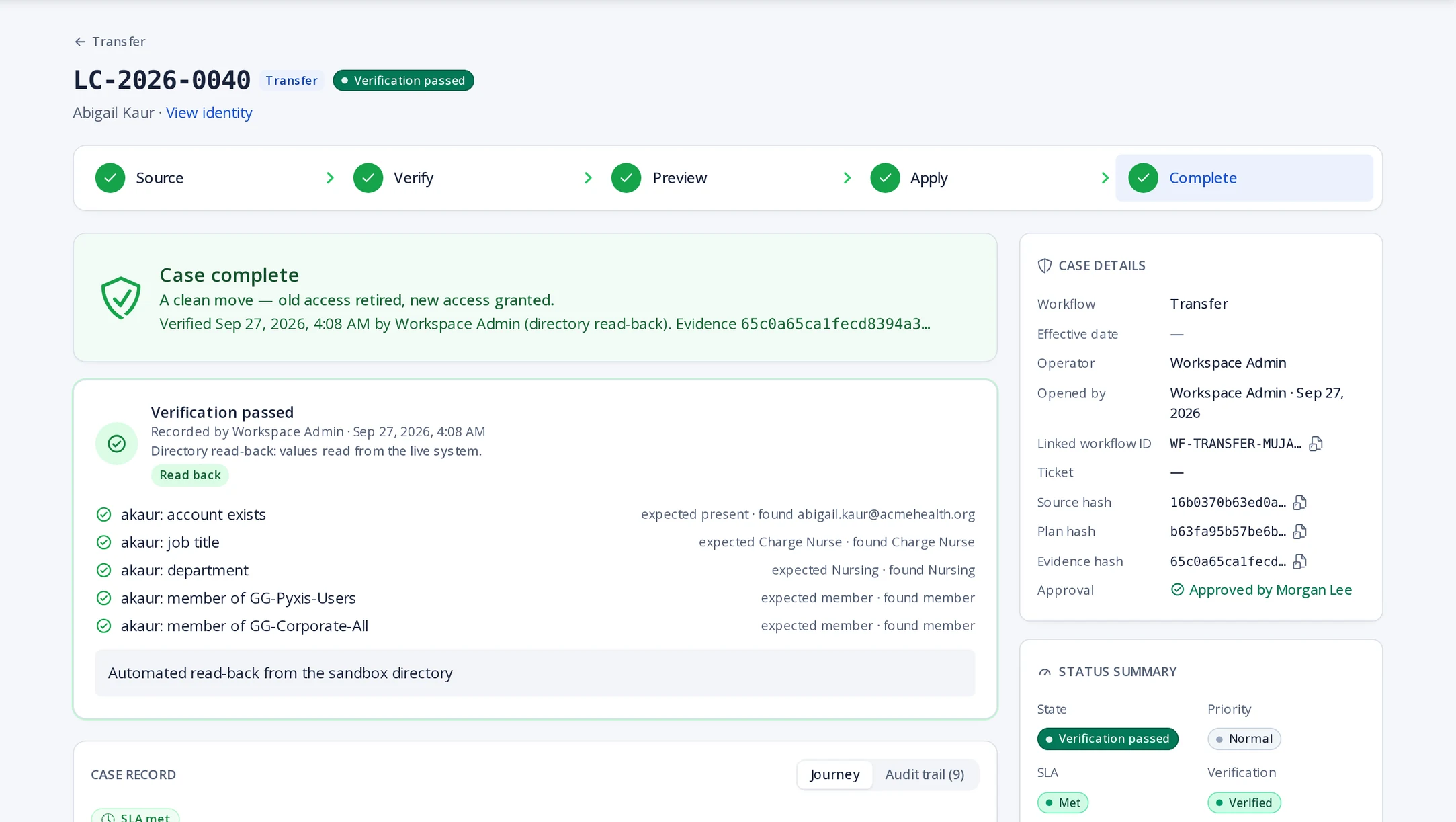
A real record from the evaluation workspace. Not a mock-up.
Capabilities
Six capabilities behind every case.
Lifecycle, Identity, Access, Automation, Service and Evidence, each shown on a real Essentriq screen, and where it sits in the request-to-evidence workflow.
- 1Request
- 2Plan
- 3Approve
- 4Execute
- 5Verify outcome
- 6Evidence
Turn a new hire, transfer or termination into a checked execution plan.
- New request
- Access plan
- Approval
- Provision
- Verify
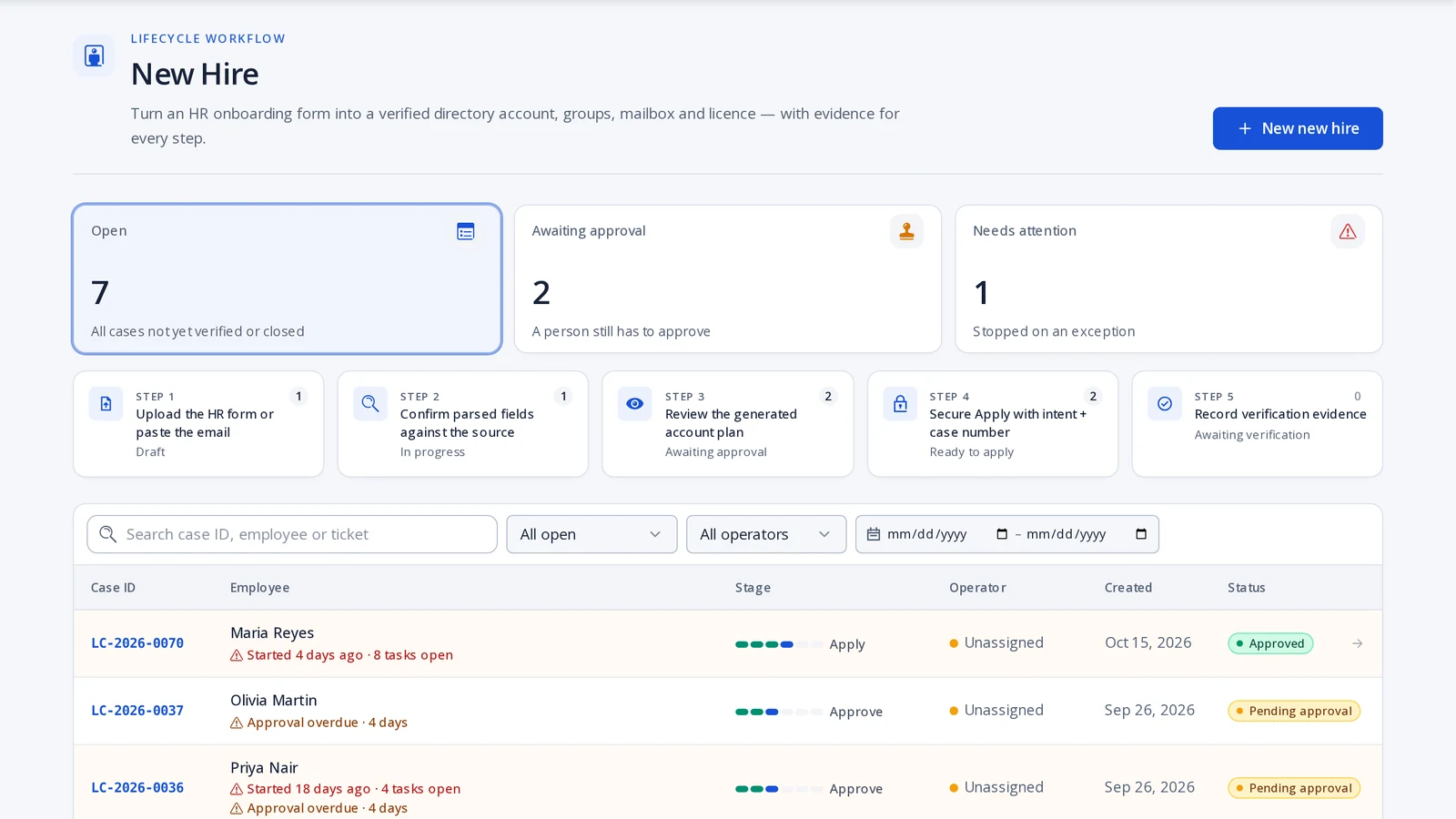
Tap the screen to view it full size
The HR form is parsed into fields you confirm against the source, then turned into an account plan.
Real screens from the evaluation workspace. The organisation and people are sample data.
Security & evidence
Built to be checked, not just trusted.
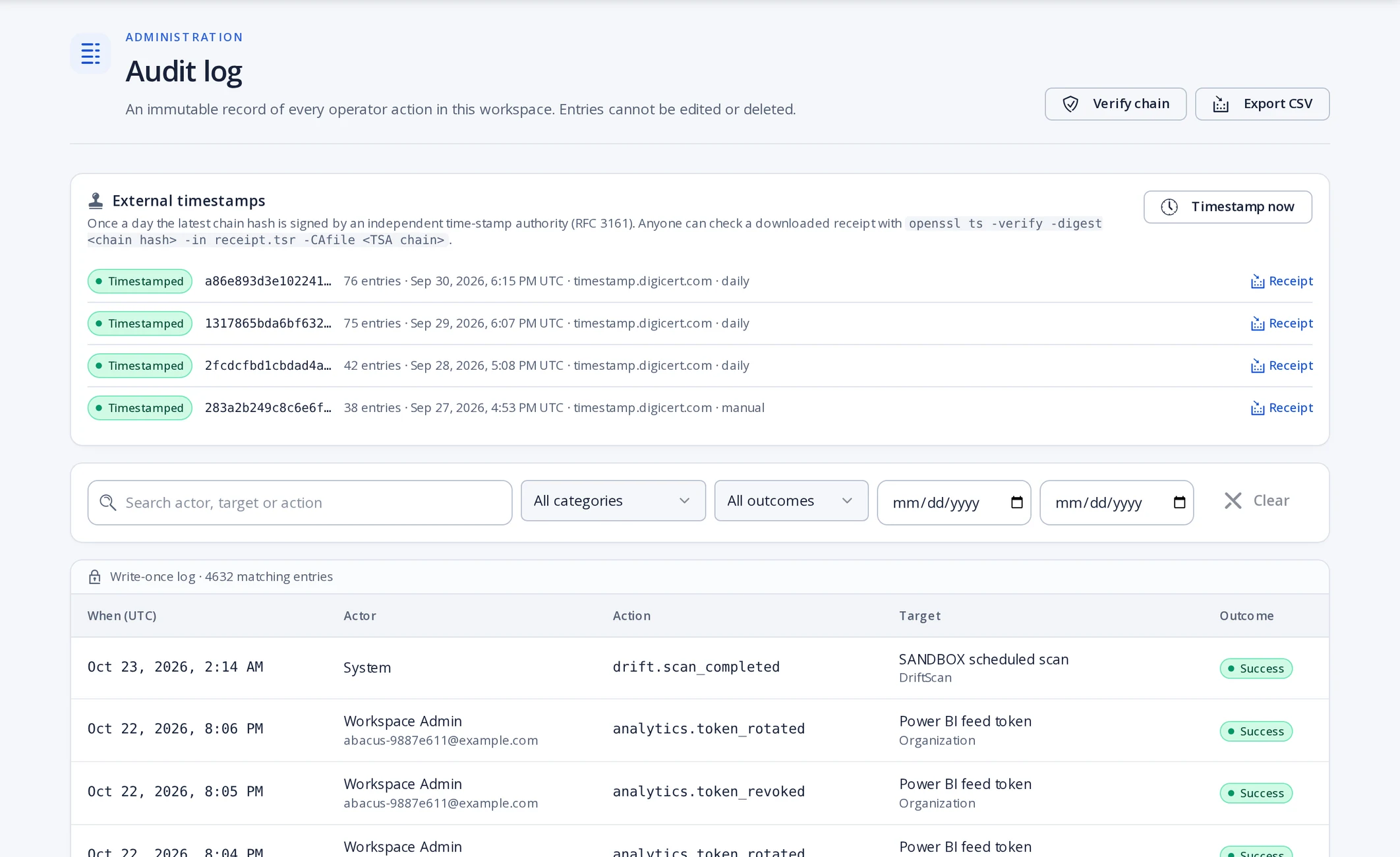
Product screenshot: the audit log from the evaluation workspace.
Hand your auditor a record, not a story.
Every step of every case is written to an append-only log. The evidence is generated as the work happens, not assembled afterwards.
Pricing
Simple pricing, per workspace
Every plan starts with a 14-day evaluation. Approvers, auditors and requesters are always included at no cost. Prices are per workspace, billed monthly in US dollars.
Starter
Core lifecycle automation for small service desks
- Up to 5 operators
- New Hire, Rehire, Transfer & Termination
- Identity directory & work queue
- Entra ID connector
- ServiceNow, Jira & ServiceDesk Plus ticket sync
- Device assignment and return tracking
- Immutable operator audit
Professional
RecommendedEvery workflow, plus Okta, Microsoft 365 and HR connectors
- Up to 15 operators
- All lifecycle & special-population workflows
- Temporary, rotating & third-party populations
- Access requests & mailbox management
- Okta and Microsoft 365 Graph connectors (Exchange coming soon)
- On-prem Active Directory connector agent (preview)
- Workday and BambooHR HR feeds
- Approval & verification queues
Enterprise
For large organisationsUnlimited operators, API access and priority onboarding
- Unlimited operators
- Everything in Professional
- Provisioning job API access
- Advanced audit export
- Priority onboarding support
Who builds Essentriq
An independent product, built in Toronto.
Essentriq is designed and built by Sher Ali Khan, founder, in Toronto, Canada.
It is not a module of a larger suite. It does one job: prove that every joiner, mover and leaver change was made, checked and recorded.
If you are evaluating it, you will talk to the person who builds it.
Contact the founderReady to put every change on the record?
Make every identity change provable.
The request, decision, execution, verification and evidence stay together in one controlled lifecycle record. 14 days free, no credit card.